
Stage in RAM
Drop files into a volatile staging layer and inspect their state.
 GhostLayerby The Proof Foundry
Volatile file staging
A temporary working layer for your files. Stage them in RAM, review your changes, and commit only what you choose to keep.
Made for the way you work
Stage, select, edit and commit at your own pace.
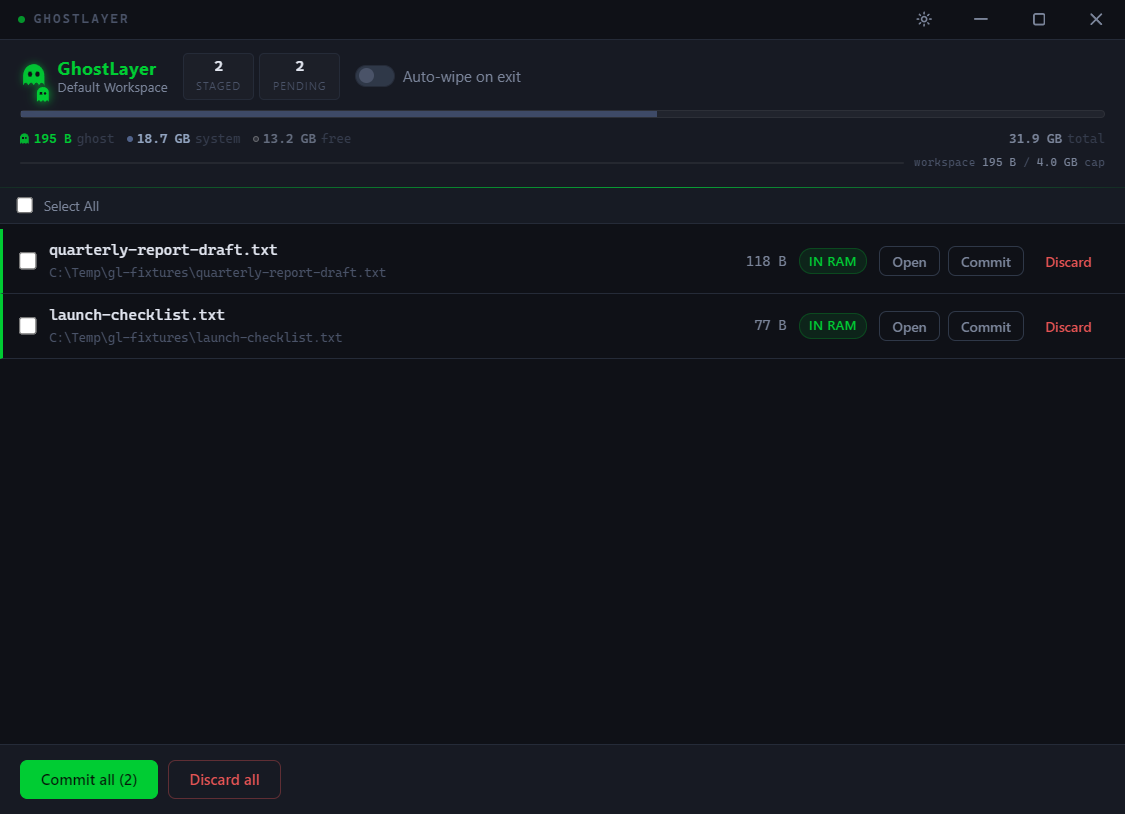
Drop files into a volatile staging layer and inspect their state.
Select a group with checkboxes or keyboard shortcuts. Open staged files in their associated editor.
Commit or discard the selected files. If a destination changed, conflict recovery preserves both versions.
Temporary, until you say otherwise
Make the call on a few sample files. This preview models the choice between temporary staging and an explicit commit.
Nothing permanent.
Until you make it so.
Website preview · sample data in this page only. No real files are staged, saved or erased.
Get the software
Public Windows installer v0.4.0. Stage, edit and commit on your own machine.
This Windows package is unsigned, so SmartScreen may prompt on first launch. Verify the SHA-256 checksum below before deciding whether to run it.
This Windows package is unsigned. Verify its checksum before deciding whether to run it; a matching checksum confirms the file matches the published artifact.
5c0f00fb7e6e58526f400e25a0f05e9f948c503479c82d6be4eb7d0aa9f06251
Windows verification: Get-FileHash ".\GhostLayer-Setup-0.4.0.exe" -Algorithm SHA256
Set up and keep it yours
GhostLayer-Setup-0.4.0.exe installer (Electron/NSIS, unsigned). Windows SmartScreen may prompt — choose More info → Run anyway after verifying the SHA-256.%TEMP%\GhostLayer\ are purged on commit or discard; interrupted sessions can leave recoverable copies there. Uninstalling the app does not clear %TEMP%\GhostLayer\; remove it manually if present.Release records, checksums, detailed scope and qualification evidence. Candidate evidence does not change public availability.
Five deliberate steps. No hidden actions between them.
Drag and drop files into the GhostLayer window. They appear in the staging list with their names, sizes, and status. They exist in RAM — no disk writes occur at this stage. The layer is volatile by design.
Select multiple files with checkboxes, Ctrl+A to select all, or Shift-click for range selection. Commit Selected or Discard Selected operate on the chosen subset only. Unselected files are unaffected.
Open a staged file in its associated desktop application. When you save in the editor, GhostLayer synchronizes the changes back into the staged RAM copy and marks the file as modified. Opening for edit creates a temporary disk copy that is removed when the edit session closes normally.
If a destination changed after staging, GhostLayer blocks the commit and offers non-destructive recovery: Keep Staged, Show Destination, or Save Copy. Save Copy creates a new file only and never overwrites an existing filesystem object. Interrupted edit sessions leave recoverable temporaries — never auto-deleted.
Commit the files you want to keep. The commit destination is derived from the staged file identity in the main process — a renderer-supplied destination cannot redirect the write. Uncommitted staging is volatile. Opening an editor creates a temporary disk copy; interrupted edits can leave recoverable copies.
Conflict safety: GhostLayer's block-on-conflict guard is preserved. If a destination file changes on disk after staging, the commit is blocked and both versions are kept — the staged RAM copy and the changed disk file. There is no Overwrite or force-commit operation.
What changed in v0.4.0 — full release notes ↗
The following public artifacts are hosted on the Proof Foundry's own distribution domain. They are the same five objects that form the canonical release set — the installer, three evidence files, and the release notes.
What the receipts prove: The published installer SHA-256 matches
the hash recorded at build time. The release was verified with 188/188 tests passing,
a clean build, and packaged runtime qualification (13/13 steps).
What the receipts do not prove: The software is malware-free.
The software is Microsoft-signed. SmartScreen will not warn. Any third party
attested to its safety. The receipts establish custody and provenance — not safety.
Privacy & Data Flow
Evidence-backed behavior for GhostLayer Windows v0.4.0.
Primary file staging is held in volatile RAM (lost on app close). Launching external text editors creates temporary working files in %TEMP%\GhostLayer\, which are purged on commit or discard.
Proof Foundry's own review of the GhostLayer source found no network capabilities or internet connections. All staging, conflict resolution, and file commits occur locally on your machine.
Zero background telemetry or analytics tracking. Interrupted edit sessions retain recoverable temporary disk copies so no working edits are silently lost.
Volatile file staging
Stage in RAM, review your changes, and commit only what you choose to keep.